
How to remove vocals from a song and make an instrumental
The cleanest way to remove vocals today is AI source separation: a model trained on music splits the mix into a vocal track and everything else, and you keep the instrumental. You can do it offline on your own computer, without uploading the song anywhere.
Option 1: look for an official instrumental first
Many albums and singles come with an instrumental version, and many artists release them for remix contests. Search your streaming or download store for the song name plus "instrumental". If one exists, it will always beat anything you can make yourself, because it comes from the original multitrack.
Option 2: the phase-cancel trick (free, rough)
In many mixes the lead vocal sits in the center, equally loud in the left and right channels. Subtract one channel from the other and anything in the center cancels out. Audio editors such as Audacity include an effect for this.
- Open the song in your audio editor. It must be a stereo file.
- Select the whole track and apply the vocal reduction effect (in Audacity it is called Vocal Reduction and Isolation).
- Listen and adjust the frequency range so the bass and kick drum survive.
It costs nothing, but it removes everything in the center, including bass, kick and snare, and leaves reverb and stereo backing vocals behind. The result often sounds hollow and is mono. It is fine for a quick sing-along, not for a track you want to perform over or release.
Option 3: AI separation (clean, works on almost any song)
Separation models such as Demucs were trained on songs whose separate parts were known. They learn what a voice sounds like and rebuild the mix as separate tracks. You get both a vocal and an instrumental, and the instrumental keeps its bass, drums and stereo width.
- Start with the best source you have. A WAV or a high-bitrate file gives the model more to work with than a small MP3. If you're pulling the song from a link, save it as a WAV.
- Choose an instrumental split (vocals out, everything else kept), or split into all stems if you also want to change the balance of the band.
- Run the split and listen to the instrumental on headphones, especially the loud choruses where traces of the voice are most likely.
- Export as WAV if you plan to edit, mix or perform over it. Convert to MP3 only at the end, if you need a small file.
You can do this with online services, which upload your song to their servers, or with a desktop app that runs the model on your own computer. Offline has three practical advantages: no upload, no file-size or monthly limits, and it keeps working without a connection.
Where AudioPrism fits
AudioPrism is a desktop app for Windows and Mac (Apple Silicon) that does option 3 offline, with Demucs running on your own machine.
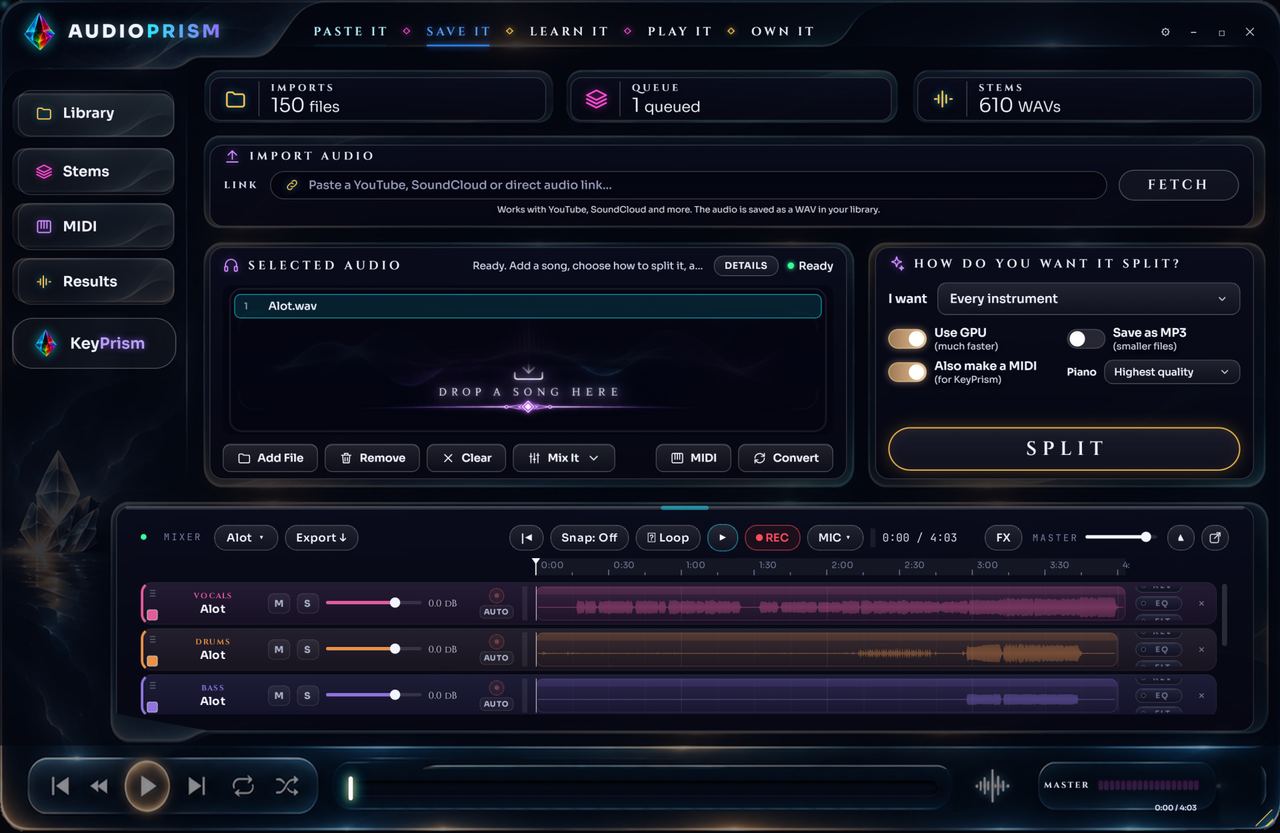
- Paste a YouTube, SoundCloud or direct link and press Fetch (the audio is saved as a WAV, not an MP3), or drop in a file you already have.
- Under "How do you want it split?" choose an instrumental. You can also choose an acapella, any single instrument, or all six stems: vocals, drums, bass, guitar, piano and other.
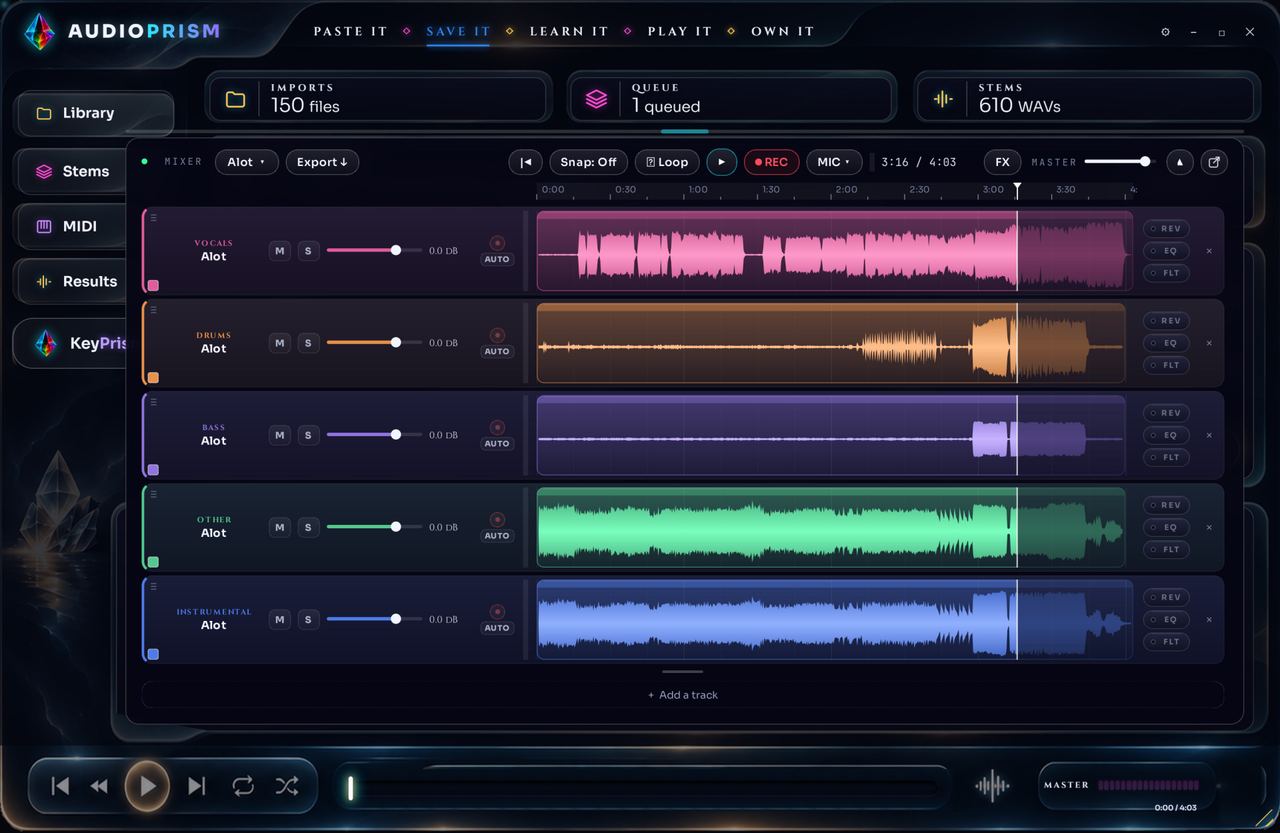
- Press Split. Each result opens as its own track in the built-in mixer, where you can mute, solo and balance the parts, and record yourself over the song.
If you'd like to play the song rather than sing over it, KeyPrism, the piano trainer built in, turns the same song into falling notes with note names and fingering, and any stem exports to MIDI with one button. No account, no upload, no daily limit.
Honest limits
- Separation can leave traces. Heavy reverb, doubled vocals and choirs can leave faint traces in the instrumental.
- The fast path is an NVIDIA GPU. Without one AudioPrism uses the CPU: slower, but it works. On Mac it runs on Apple Silicon.
- Mac: Apple Silicon only (M1 or newer, macOS 12+). Windows: 10/11 64-bit, and the download is a 7.3 GB zip.
- You are responsible for having the rights to the audio you process, especially if you publish the result.
Questions people ask
Can I remove vocals from a song for free?
Yes. The phase-cancel trick in a free audio editor costs nothing, and there are free AI tools. The trade-offs are quality (phase cancel), file limits and uploads (many online tools), or setup work (some open-source tools). AudioPrism is paid, one-time, and runs offline.
Will the instrumental be completely clean?
Usually very close, but not always. Reverb, backing vocals and sounds that share the voice's range can leave faint traces. Starting from a high-quality WAV helps.
Can I keep the vocal too?
Yes. AI separation gives you both parts. In AudioPrism you can choose an acapella, an instrumental, any single instrument, or all six stems.
Does AudioPrism upload my song?
No. Separation runs with Demucs on your own computer. There's no account and no daily limit.
Does it work on Mac?
Yes, on Macs with Apple Silicon (M1 or newer, macOS 12+). Intel Macs are not supported.