
How to isolate the piano from a song
Use a stem separator that has a dedicated piano stem. It pulls the piano out of the mix as its own audio track, which you can listen to on its own, slow down, convert to MIDI or learn note by note.
Why isolate the piano?
- To hear what is really being played. In a band mix, the piano's left hand often hides under the bass and its voicings under the guitars.
- To transcribe it. Writing down notes is far easier from a solo part than from a full mix.
- To learn it, by ear or from a trainer that shows you the notes.
- To practice over the song. Mute the piano stem and play the part yourself with the band.
Step by step
- Get a good source. WAV or another lossless file. If you start from a link, save the audio as WAV rather than MP3.
- Use a separator with a piano stem. A basic four-part split puts piano in "other" along with synths and guitars, which defeats the purpose.
- Split and listen to the piano stem soloed on headphones. Then listen to "other" too: pads, organs and electric pianos sometimes land there.
- Slow it down to hear fast runs. Most players and DAWs can slow audio without changing the pitch.
- Turn it into notes: by ear, or by converting the piano stem to MIDI and correcting it against what you hear.
- Learn it in small pieces: one phrase at a time, hands separately, then together, at a slow tempo first.
Reading what you hear
When you work out a piano part from a stem, start with the lowest note of each chord (the left hand), then the top note (usually the melody or a counter-melody), then the notes in between. Pop piano parts repeat a lot: once you have the pattern for one chord, the next chord is usually the same shape moved up or down.
Where AudioPrism fits
AudioPrism is a desktop app for Windows and Mac (Apple Silicon) built around this exact path: get a song, isolate the piano, see the notes, learn them.
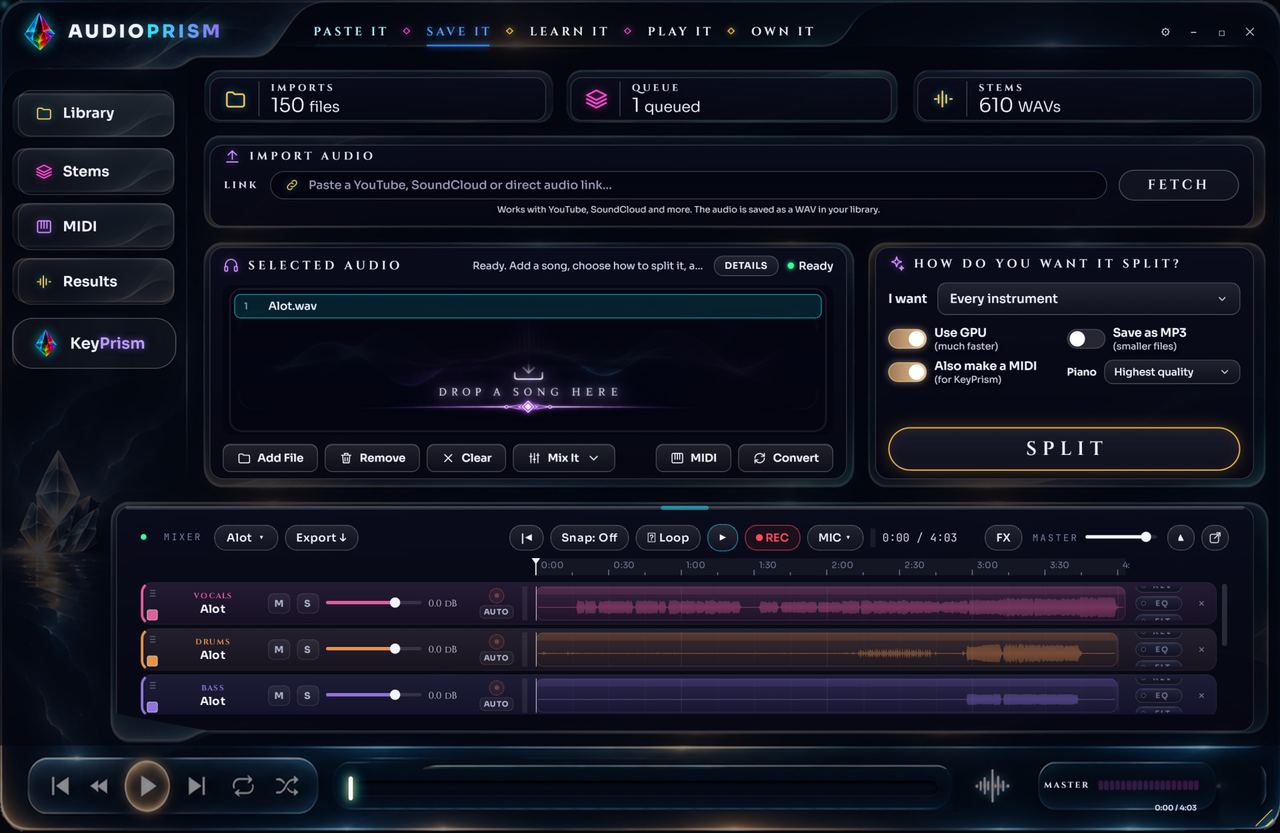
- Get the song: drop in a file, or paste a YouTube, SoundCloud or direct link. Audio from a link is saved as a WAV.
- Isolate the piano: ask for the piano on its own, or all six stems (vocals, drums, bass, guitar, piano, other). Demucs runs offline on your own computer.
- Get the notes: the piano stem, or any other stem, exports to MIDI with one button.
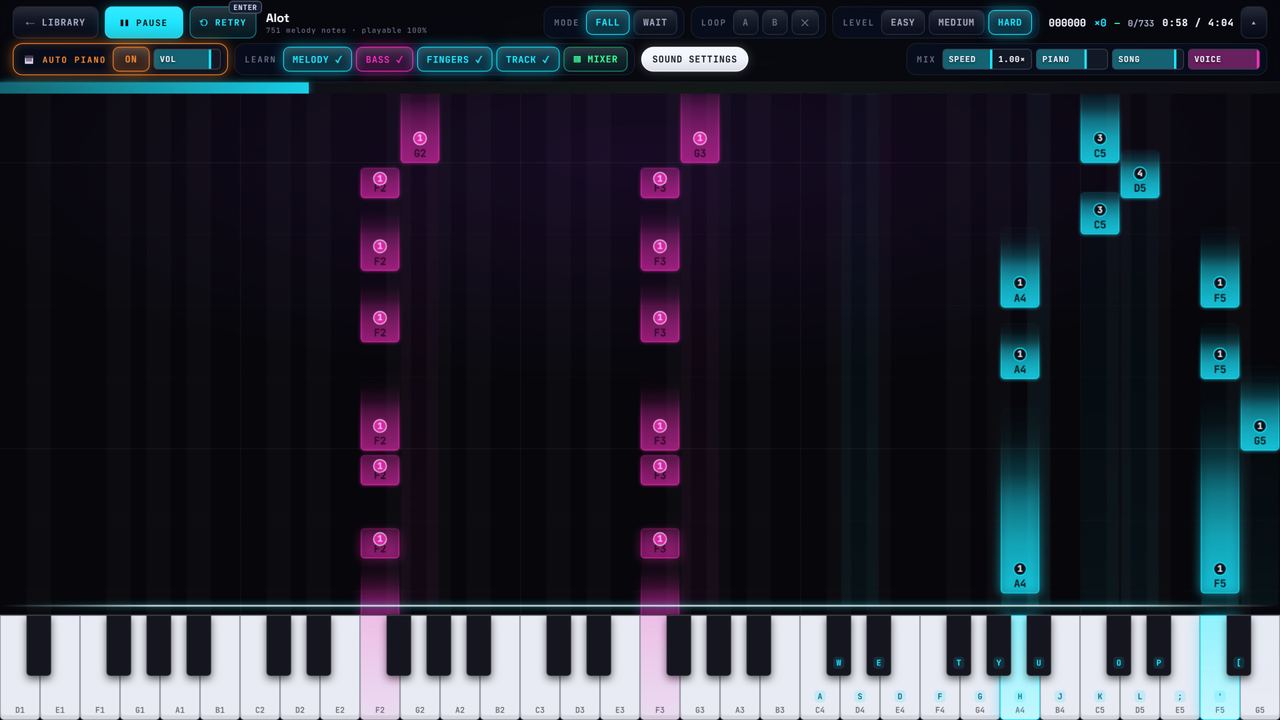
- Learn it: KeyPrism, the piano trainer built in, isolates the piano part and shows it as falling notes with note names and fingering, at Easy, Medium or Hard. Slow it to 40%, loop a bar, practice hands separately, and keep the vocal on its own fader so you still hear the song.
- Play over it: mute the piano in the built-in mixer and record yourself with the rest of the band.
Honest limits
- A separated piano can carry faint traces of other instruments, especially in dense choruses.
- KeyPrism's part is built from the recording: a playable arrangement, not an official score.
- Splitting is fastest on an NVIDIA GPU and falls back to the CPU without one. On Mac it needs Apple Silicon (M1 or newer, macOS 12+).
- The Windows download is a 7.3 GB zip.
Questions people ask
Why not just use an equalizer to bring out the piano?
An EQ boosts frequencies, and the piano shares them with vocals, guitars and synths. It can make the piano a little clearer, but it can't remove the other instruments. Separation can.
Does every stem splitter have a piano stem?
No. Many split into vocals, drums, bass and other, and put the piano in other. Check for a piano stem before you choose a tool. AudioPrism has one: its six stems are vocals, drums, bass, guitar, piano and other.
Can I get the notes, not just the sound?
Yes. Export the piano stem to MIDI with one button, or open the song in KeyPrism to see the notes as falling notes with names and fingering.
How do I learn the isolated piano part?
In KeyPrism: slow it to 40%, loop a bar, practice hands separately, and use WAIT mode so the song holds until you play the right note.
What if the song has synth or electric piano?
Sounds close to a piano may land in the piano stem or in other. Listen to both stems before you transcribe.